Tori
See what Tori did
Tori's answers now start with a line that says how long the answer took and in how many steps. Open it to see what Tori read, what it measured and what it changed.
What it is
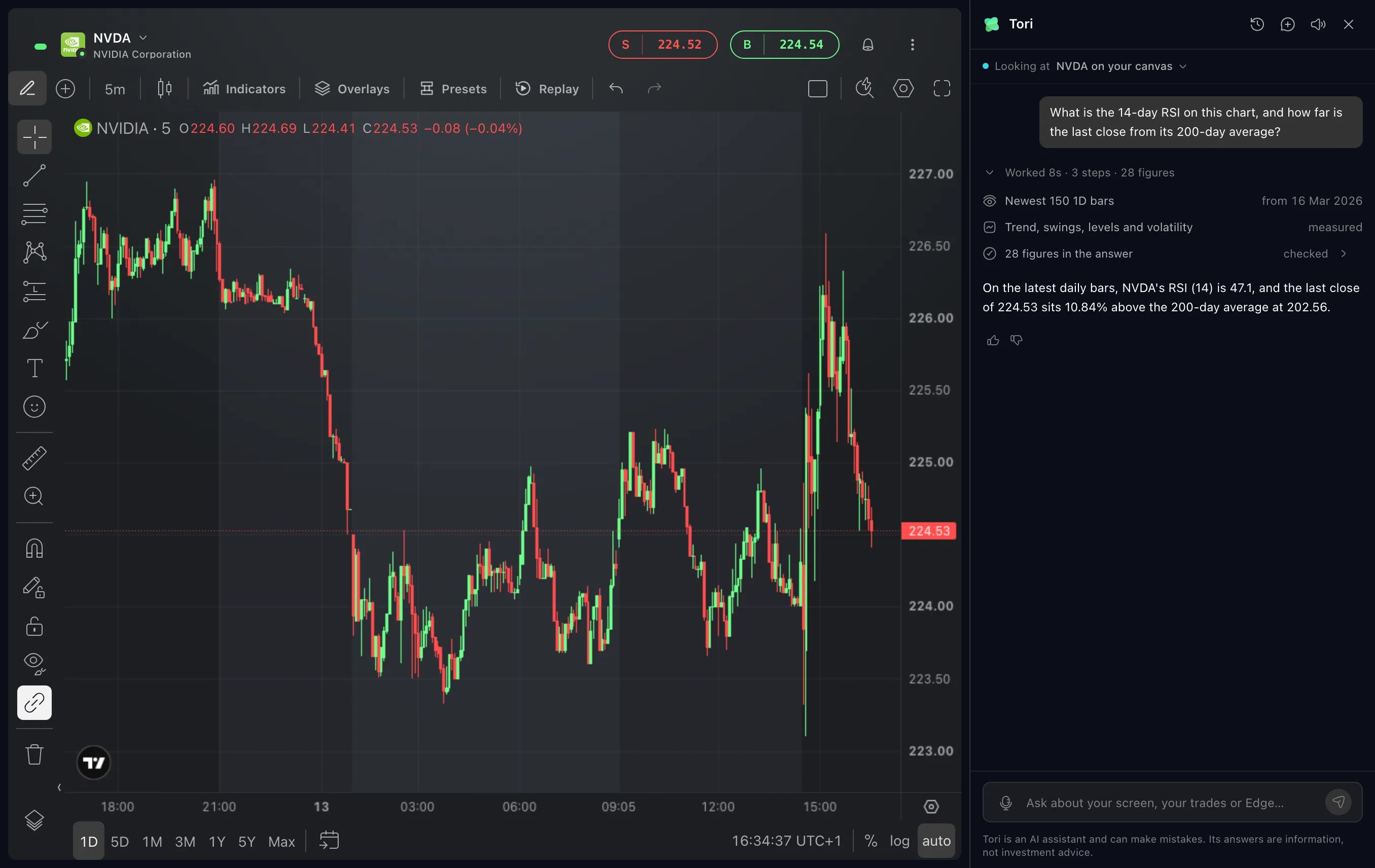
Tori now shows its work. Above an answer, one line says what the answer took: how long Tori worked, in how many steps, and how many figures the answer was checked against. It reads, for example, 8 seconds, 3 steps and 28 figures. Click the line and it opens into the steps themselves.
An answer about your chart is only as good as what it was read from. The steps say which candles Tori read, what it measured on them and what it did next, so you can judge the answer and not only read it.
How to use it
Open Tori from the bar at the bottom of Edge and ask about your chart. The top of the panel names the chart Tori is looking at.
While Tori works, the steps are open: the line counts the seconds, and each step is named as it happens. When the answer is there, the steps fold into the one line.
Click the line above the answer to open the steps again. They list what Tori read from the chart and from when, what it measured, such as the trend, the swings, the levels and the volatility, each change it sent, and how many figures the answer was checked against.
Click that last step to see the figures one by one, each with its value: the last close, the high and the low of the candles Tori read, the levels it found, and readings such as RSI.
When Tori changes your chart, the changes are listed under the answer, one line each, with Undo beside the list.
Good to know
The first step says how many candles Tori read, on which interval and from what date.
The figures come from Edge's data: Edge computes them, and the answer is checked against them.
The list of changes names each one, such as an indicator that was added or a line and its price. A setting shows what it was and what it is now.
When a change concerns a widget other than the one Tori is looking at, the steps list it as sent, and that widget's own answer follows, with a line of its own.
Screens are from a Demo account. The instruments and prices in them are illustrative.