Trading
One stop loss for a whole holding
Hold several positions in one asset? Set their stop loss and take profit together in My Portfolio, in one editor.
What it is
etoro opens a separate position for every buy. Buy the same asset three times and you hold three positions, each with its own stop loss and take profit. Edge calls the positions you opened yourself in one asset a holding, and My Portfolio now edits a holding as one.
Until now, changing the plan for an asset meant opening each of its positions in turn. The holding editor sets one stop loss and one take profit on all of them in one step.
How to use it
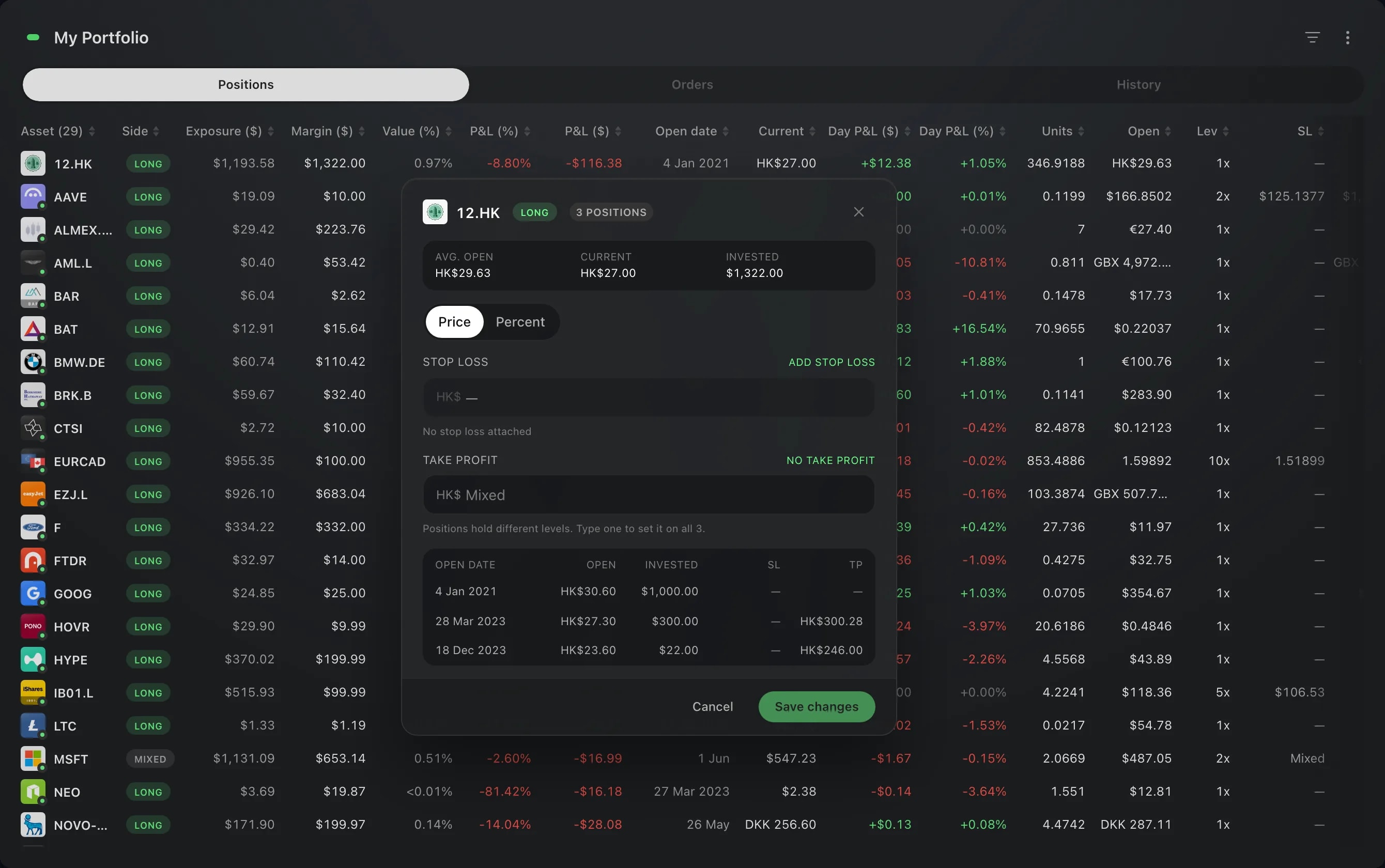
In My Portfolio, find the asset. Its SL and TP columns show the holding's levels: a price when every position shares it, Mixed when they differ, and a dash when no position has one.
Right-click the asset and choose Edit SL/TP. The menu item also says how many positions it covers. You can click the value in the SL or TP column instead: the editor opens on that field.
The editor opens on the holding's average open price, its current price and the amount invested. Type one stop loss and one take profit. Price and Percent, at the top, choose how you enter them: as a price, or as a distance from the current price. The list underneath shows every position of the holding with its own levels.
Choose Save changes. Nothing is sent before that, and closing the editor leaves every position as it was.
Good to know
The editor covers the positions you opened yourself in that asset.
When the positions hold different levels, the field says so. Typing a level there sets it on all of them.
Each position is still checked against its own limits.
A Trailing stop can be switched on for the whole holding in the same editor, where its positions allow one. It applies to the positions that have a stop loss: the stop then moves with the price when the price moves in your favour.
To see the positions one by one, the same right-click menu opens the list of that asset's positions.
An asset that you hold both long and short has one menu item for each side. A click on its stop loss or take profit value shows its positions instead of the editor.
Screens are from a Demo account. The instruments and prices in them are illustrative.