Trading
Futures spread alerts
Set a level on the spread between two futures contracts in the Futures Curve, and know when the spread reaches it.
Spread alerts are on the Futures Curve, which Edge shows to accounts that can trade futures.
What it is
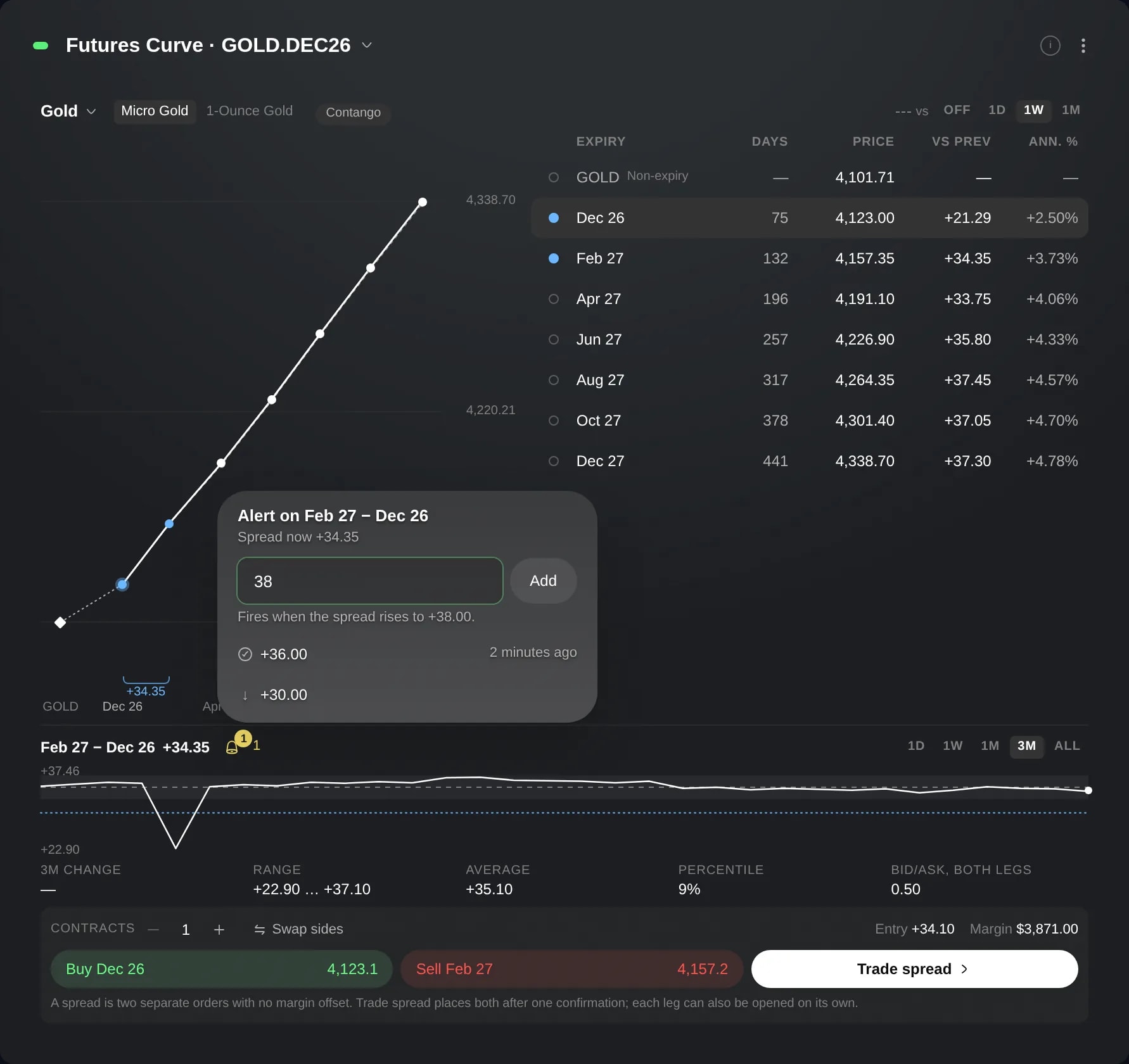
A spread alert tells you when the spread between two contracts of one futures market reaches a level you choose. The spread is the later contract's price minus the earlier one's, as the Futures Curve shows it for the pair you select.
You set them where you read the spread: in the Futures Curve, on the pair you select. Each level waits for the spread to rise or fall to it, and one list keeps your levels on every pair, from any futures market.
Reach for one when you follow a calendar spread and want to know when it gets to a level, without keeping the curve on screen.
How to use it
Click the + button in the sidebar, choose Add widget and search for Futures Curve. If it opens on an instrument without futures, pick a market from the list it offers. To switch market later, use the market name at the top left.
Choose two contracts with the round toggles at the start of their rows. The panel under the chart names the pair, later contract first, and shows its spread now and its history. To begin with, the two nearest contracts are chosen.
Click the bell beside the pair's name. It opens the alerts for that pair, with the spread now. In a tile too small for the pair's panel, the bell sits at the right end of the row with the market's name instead.
Type a level and press Add. The line under the field says which way the alert waits: above the spread now, it fires when the spread rises to your level; below it, when the spread falls to it.
The level joins the list under the field, with an arrow for its direction. On the spread's history it is drawn as a dotted line, or named at the edge when it lies far outside the history's range. The number beside the bell counts the levels the pair is waiting for.
A level the spread reached shows a check mark and how long ago, and a badge on the bell counts the levels reached on all your pairs. Point at a row for its buttons: the circular arrow, Set again, turns a reached level of the pair in view back on, and the cross, Remove, deletes any level without asking twice.
Good to know
An alert fires once. It then stays in the list as reached, so you can set it again or remove it.
If you are in Edge when a level is reached, a notice at the top right of the screen names the pair and the level.
An alert is checked only while both contracts trade: a closed contract's last price fires nothing. If the spread is past your level when both trade again, the alert fires then.
A level equal to the spread now cannot be added, and neither can a level the pair is already waiting for. The line under the field says why.
The bell lists every spread alert you have, on any market: the pair in view first, then each other pair under its own name. An alert stops when the first of its two contracts to expire stops trading.
You can have up to 50 spread alerts. At the limit, adding one first removes the alerts that stopped longest ago. When there are none it can remove, the line under the field asks you to remove one yourself.
Screens are from a Demo account. The instruments and prices in them are illustrative.