Charts
Your closed trades on the chart
Turn on Closed trades in a chart's Overlays to see where each of your past trades on the instrument opened and closed, colored by its result.
What it is
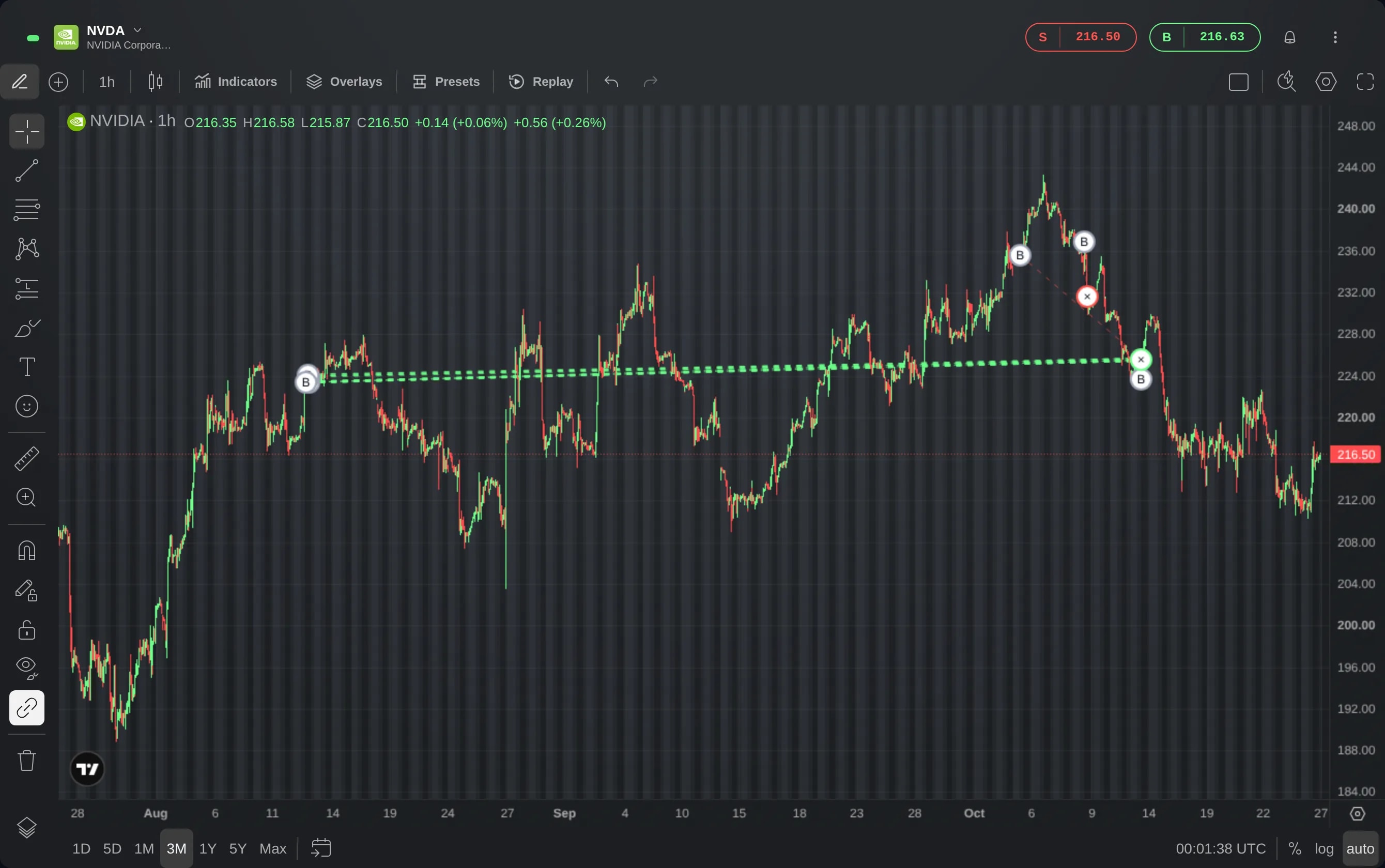
Closed trades marks your past trades on the chart of the instrument you traded. Each trade gets a B or an S where it opened, for a buy or a sell, an × where it closed, and a dashed line between the two. The × and the line are green when the trade gained, red when it lost and amber when it broke even.
It puts your own entries and exits next to the price around them. You see where you bought and sold, how long you held, and what the price did before and after, without leaving the chart for a list of trades.
Closed trades is a layer of the Chart widget, beside your positions, your orders and their stop loss and take profit. It is off on a new chart until you turn it on.
How to use it
Start from a Chart widget showing an instrument you have traded and closed before.
Choose Overlays in the toolbar at the top of the chart.
Turn on Closed trades. The chart marks your trades on this instrument that closed within the stretch of time it shows.
To bring in older trades, show more of the past: choose a longer range at the bottom of the chart, such as three months or a year, or scroll the chart back. The trades for the new stretch load once the chart stops moving.
Point at a marker to read its trade: the size, the entry and exit prices and the profit or loss. The × also says how long the trade was held and why it closed, for example by hand or at a stop loss.
Click a marker to open its menu. Open again fills in a new order for the same instrument, direction and amount, and places nothing until you confirm it. Hide closed trades takes the layer off the chart.
Good to know
Trades in the same direction that opened, or closed, on the same candle at nearly the same price share one marker, and a shared × takes the color of their combined result. Its tooltip and its menu list the trades, and Open again starts from the one that closed last.
Open again copies the instrument, the direction and the amount, and nothing more. Check the rest of the order before you confirm it.
When the chart's range holds more closed trades than it has drawn, a pill at the bottom of the chart says how many, for example 37 more closed trades. Each click loads up to 50 more, and one chart draws at most 200.
Trades opened through a copy, of another investor or of a Smart Portfolio, are not drawn. The layer shows the trades you placed yourself.
While the chart replays its past, your closed trades leave it, with your positions and orders.
Screens are from a Demo account. The instruments and prices in them are illustrative.